
Preview Deployments with Firebase Hosting & GitHub Actions
When I briefly worked with Peec AI, one of the first things I noticed that could greatly improve the developer experience was adding preview deployments to their toolbox. They already had code reviews, but the process felt incomplete without being able to click around a real, live version of the actual changes.
This becomes even more critical in the age of vibe coding.

Why Preview Deployments Matter
If you've used Vercel or Netlify, you know this experience is built-in. Every pull request gets deployed to a separate environment, ideally with its own subdomain, so the result of the code changes can be showcased easily.
For growing teams, the benefits compound quickly:
- Visual verification — Catch UI bugs that diffs can never reveal
- Faster feedback loops — Designers and PMs can review without setting up the project locally
- AI agent workflows — When an agent like Cursor opens a PR, a human can visually verify the result before approving
- Parallel development — Multiple PRs can be live simultaneously without stepping on each other
- No staging bottleneck — Teams no longer wait for a single shared staging environment
Firebase Hosting doesn't give you this out of the box, but with GitHub Actions and Firebase's Preview Channels feature, you can build the exact same thing.
What We're Building
Here's the full lifecycle we'll automate:
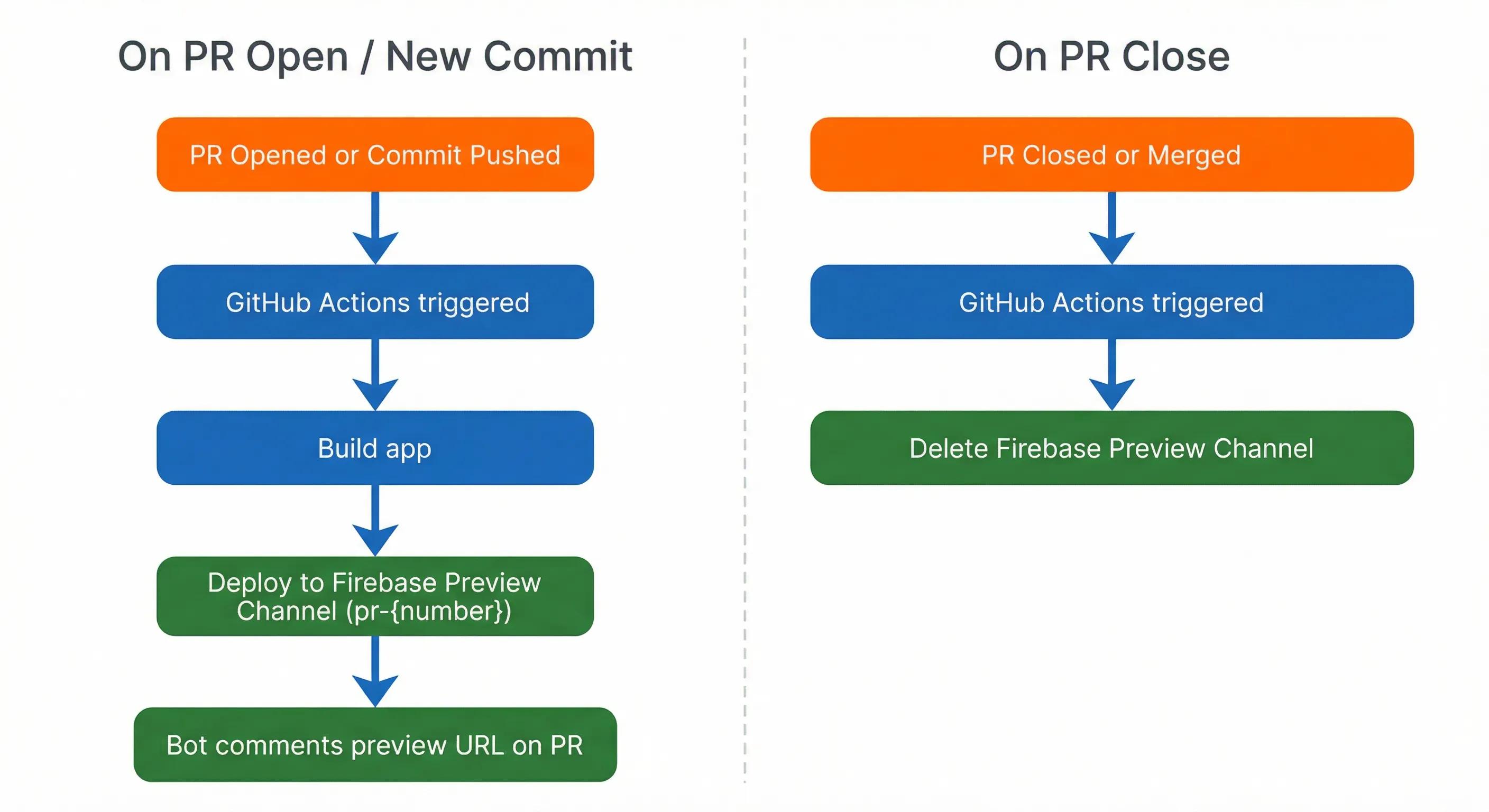
- A PR is opened or updated → a preview deployment is created (or updated)
- A bot comments the preview URL directly on the PR
- The PR is closed or merged → the preview deployment is automatically deleted
Every commit to the PR branch refreshes the preview. No manual steps, no "can you deploy this to staging?"
Prerequisites
- A Firebase project with Hosting enabled
- A GitHub repository
- Firebase CLI installed (
npm install -g firebase-tools) - A Firebase service account (we'll generate this)
Implementation
1. Setting Up Firebase Hosting
If you haven't enabled Firebase Hosting yet, run:
firebase init hosting
Follow the prompts to set your public directory and configure as a single-page app if needed. Commit the generated firebase.json and .firebaserc to your repository.
2. Generating a Service Account
GitHub Actions needs permission to deploy to Firebase on your behalf. Go to your Firebase Console → Project Settings → Service Accounts → Generate new private key.
Download the JSON file, then add its entire contents as a GitHub secret:
Settings → Secrets and variables → Actions → New repository secret
Name it FIREBASE_SERVICE_ACCOUNT.
Note: Paste the raw JSON content as-is into the secret value. Do not base64-encode it or wrap it in quotes — the action reads it as a plain string and handles parsing internally.
3. The Preview Deployment Workflow
Create .github/workflows/preview.yml in your repository:
name: Preview Deployment

on:
  pull_request:
    types: [opened, synchronize, reopened]

concurrency:
  group: firebase-preview-${{ github.event.pull_request.number }}
  cancel-in-progress: true

permissions:
  contents: read
  pull-requests: write

jobs:
  deploy_preview:
    runs-on: ubuntu-latest
    steps:
      - uses: actions/checkout@v4

      - uses: actions/setup-node@v4
        with:
          node-version: '20'
          cache: 'npm'

      - name: Install dependencies
        run: npm ci

      - name: Compute preview channel ID
        id: channel
        run: |
          PR_NUM="${{ github.event.pull_request.number }}"
          BRANCH="${{ github.event.pull_request.head.ref }}"
          BRANCH_20="${BRANCH:0:20}"
          RAW_ID="pr${PR_NUM}-${BRANCH_20}"
          CHANNEL_ID=$(echo "$RAW_ID" | sed 's/[^a-zA-Z0-9_.-]/_/g')
          echo "channel_id=$CHANNEL_ID" >> $GITHUB_OUTPUT

      - name: Build
        run: npm run build

      - name: Deploy to Firebase Preview Channel
        id: deploy
        uses: FirebaseExtended/action-hosting-deploy@v0
        with:
          firebaseServiceAccount: ${{ secrets.FIREBASE_SERVICE_ACCOUNT }}
          channelId: ${{ steps.channel.outputs.channel_id }}
          expires: 7d
          disableComment: 'true'

      - name: Post or update PR comment with preview URL
        uses: actions/github-script@v7
        if: success() && github.event_name == 'pull_request'
        env:
          PREVIEW_URL: ${{ steps.deploy.outputs.details_url }}
        with:
          script: |
            const PREVIEW_MARKER = '<!-- firebase-hosting-preview -->';
            const previewUrl = process.env.PREVIEW_URL || '';
            const deployedAt = new Date().toISOString().replace('T', ' ').replace(/\.\d{3}Z$/, ' UTC');
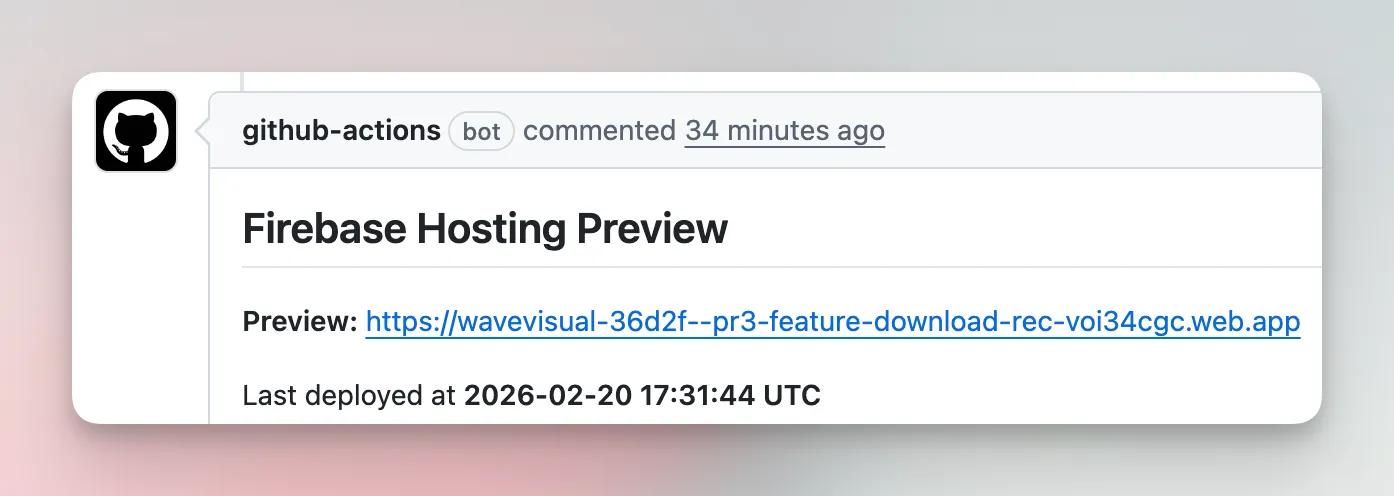
            const body = `## Firebase Hosting Preview\n\n${PREVIEW_MARKER}\n\n**Preview:** [${previewUrl}](${previewUrl})\n\nLast deployed at **${deployedAt}**`;

            const { data: comments } = await github.rest.issues.listComments({
              owner: context.repo.owner,
              repo: context.repo.repo,
              issue_number: context.issue.number,
            });
            const botComment = comments.find(c => c.body && c.body.includes(PREVIEW_MARKER));
            if (botComment) {
              await github.rest.issues.updateComment({
                owner: context.repo.owner,
                repo: context.repo.repo,
                comment_id: botComment.id,
                body,
              });
            } else {
              await github.rest.issues.createComment({
                owner: context.repo.owner,
                repo: context.repo.repo,
                issue_number: context.issue.number,
                body,
              });
            }
A few things to note:
- The
concurrencyblock cancels any in-progress deploy for the same PR when a new commit is pushed, preventing race conditions. permissions: pull-requests: writeis required for the comment step to work. Without it, you'll get a 403.- The channel ID is computed from both the PR number and branch name (e.g.
pr42-fix-auth-bug), making channels readable in the Firebase console. Special characters in branch names are sanitized since Firebase rejects them. disableComment: 'true'turns off the action's built-in comment so we can post a custom one viagithub-script. This gives full control over the comment format and uses a hidden HTML marker to find and edit the existing comment rather than posting a new one each time.expires: 7dmeans the channel auto-expires after 7 days even if the cleanup workflow fails.
4. Cleanup on PR Close
When a PR is closed or merged, we want to remove the preview channel. Create .github/workflows/preview-cleanup.yml:
name: Preview Cleanup

on:
  pull_request:
    types: [closed]

jobs:
  cleanup_preview:
    runs-on: ubuntu-latest
    steps:
      - uses: actions/checkout@v4

      - name: Compute preview channel ID
        id: channel
        run: |
          PR_NUM="${{ github.event.pull_request.number }}"
          BRANCH="${{ github.event.pull_request.head.ref }}"
          BRANCH_20="${BRANCH:0:20}"
          RAW_ID="pr${PR_NUM}-${BRANCH_20}"
          CHANNEL_ID=$(echo "$RAW_ID" | sed 's/[^a-zA-Z0-9_.-]/_/g')
          echo "channel_id=$CHANNEL_ID" >> $GITHUB_OUTPUT

      - name: Delete Firebase Preview Channel
        uses: FirebaseExtended/action-hosting-deploy@v0
        with:
          firebaseServiceAccount: ${{ secrets.FIREBASE_SERVICE_ACCOUNT }}
          channelId: ${{ steps.channel.outputs.channel_id }}
          expires: 1d
Setting expires: 1d is a belt-and-suspenders move, even if the action has any hiccups, the channel disappears within a day.
Tips & Gotchas
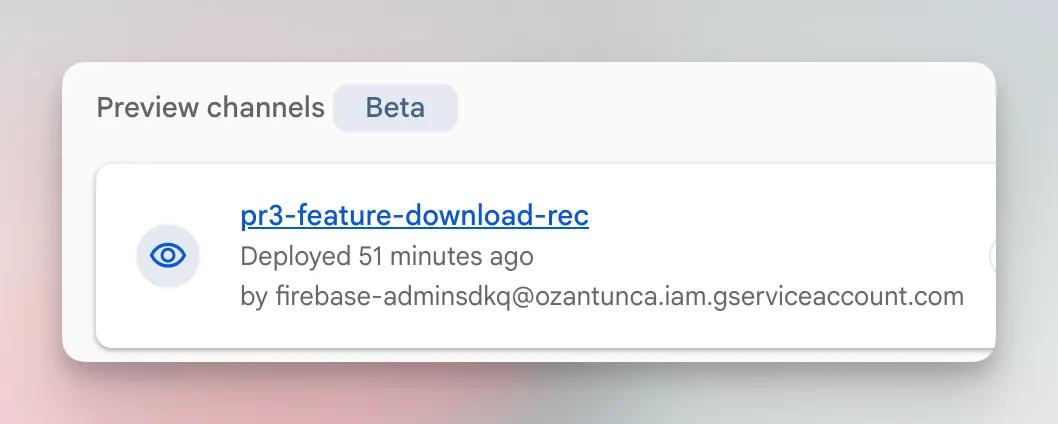
Include the branch name in the channel ID. Channel names must be unique per project. Using pr{number}-{branch} (e.g. pr42-fix-auth-bug) keeps them human-readable in the Firebase console and idempotent, the same PR always maps to the same channel. Just make sure to sanitize the branch name since Firebase rejects characters like / and :.
Firebase Hosting has a channel limit. Free plans are capped at 7 preview channels per project. If your team runs many concurrent PRs, either upgrade to the Blaze plan or use a shorter expires window (e.g. 3d) to keep things from piling up. If you’re already on the paid plan,
Cache your build. The biggest time cost is usually the build step, not the Firebase deploy itself. Using cache: 'npm' on the setup-node action shaves meaningful time off every run.
Build environment variables. If your app needs environment variables at build time, expose them in the workflow's env: block. Preview deployments should point to a staging API, not production.
The bot comment stays clean. The custom github-script step uses a hidden HTML marker (<!-- firebase-hosting-preview -->) to find and edit the existing comment on each push, rather than posting a new one every time. You get exactly one comment per PR with the always-current preview URL and timestamp.
Conclusion
Getting Firebase Hosting preview deployments working takes more legwork than Vercel or Netlify, but the end result is identical: every PR gets a live URL, every stakeholder can review without a local setup, and cleanup is automatic.
For Peec AI, this changed how we do code reviews. Engineers spend less time on "can you deploy this so I can check?" and more time on the actual review. And as we lean more on AI agents to open PRs, having a visual verification step before merging has become non-negotiable.
The two workflow files are concise enough to drop into any existing Firebase project in under 15 minutes. Give it a try or simply point your AI agent to this article and let it do the rest.